.svg)
What are verifier parameters?
A verifier parameter is a long code that is added to the end of a Canvas file URL that allows any person with that URL to access the file regardless of its file permissions, including published, link-restricted, or scheduled files, but not unpublished files. This is a standard feature of Canvas.
How did verifiers get added in the first place?
When UDOIT requests content from Canvas, Canvas automatically adds verifier parameters to every file link in a content item. When users fix issues in UDOIT, it relies on this content from Canvas in order to find the original code and replace it with the fixed code. This introduced the verifier parameters into existing file links that previously did not have them.
Example
Let's say you have a file in your course that contains the answer key for an assignment, and you have set the file to be published the day after the assignment is due. If you link to that file in one of your course pages, students will not be able to access the file due to the availability status. However, if you fix an issue on that page using UDOIT, the link to that file will contain a verifier parameter. After that, students who select the link can view the file, even before the availability date.
Note: This example illustrates one specific scenario, but verifier parameters apply to all supported file permission settings described above, not just scheduled availability.
Why should I be concerned about verifiers being added?
If a verifier is added, the file is no longer hidden from students. This can cause security concerns if faculty are waiting to publish files until after students submit assignments or quizzes. If students have access to files they shouldn't, those file links will need to be updated.
How to Fix It
UDOIT now actively removes verifier parameters from content before it is uploaded to your course. We are talking with Instructure about changing the way Canvas provides course content to external vendors. So future use of UDOIT will not add verifier parameters. Additionally, if you fix issues on pages containing file links with verifier parameters, UDOIT will also remove those parameters.
Next Steps
You will need to inspect any file links in your course to see if they have verifier parameters and remove it:
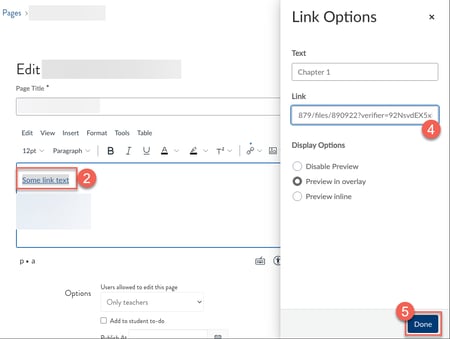 Edit a content item that contains a file link.
- Place your cursor inside the file link
- Select "Link Options"
- In the Link field, delete everything after the question mark
- Select Done