.svg)
Instructor Chat
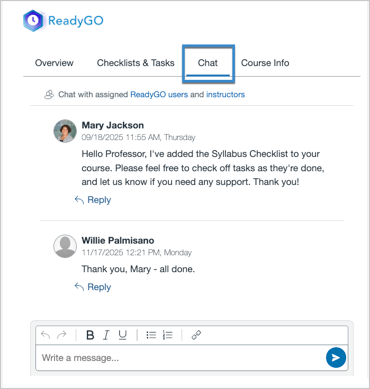
The ReadyGO Instructor Tool makes it easy for instructors and ReadyGO teams to communicate with each other. Messages sent through a course's Instructor Chat in ReadyGO will be delivered to anyone in the course with a Teacher or TA role via the ReadyGO Instructor LTI tool. Instructors can view and send messages by visiting the Chat tab in the tool.
Task Chat
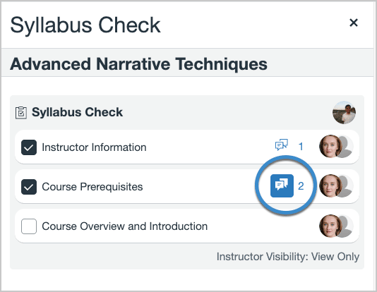
Another way to communicate directly with individual instructors is through the chat attached to individual Tasks on a Checklist with View Only or View/Edit permissions. When instructors open any Checklist that they have access to, they’ll see a chat icon highlighted in blue to indicate unread messages on a Task. And if the instructor sends a message in the Task Chat, the same blue chat icon will notify ReadyGO team members about the message in ReadyGO.
Both Instructor Chat and Task Chat feature rich content options, allowing you (and your instructors) to include links and basic formatting in your chat messages.
Message Instructors
If you’d like to send out an announcement or reminder to many instructors at once, you can select the checkbox for each course from the Courses table in ReadyGO and then use the Message Instructors feature in the Bulk Actions menu.
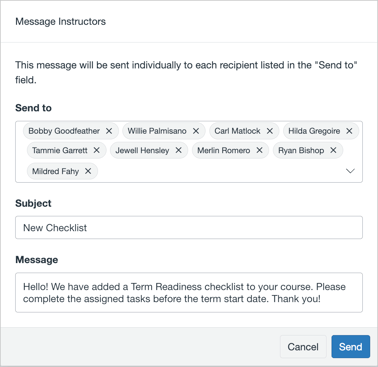
This will deliver a message to the email address associated with each instructor’s Canvas account, with the sender displayed as readygo@cidilabs.com. ReadyGO does not currently support the option to customize the sender address.
Because instructors are not able to respond to emails sent using Message Instructors, this feature works best for one-way communication. For example, if your ReadyGO team would like instructors to perform actions in their course or the LTI tool, you can use Message Instructors to send a reminder.
Currently, ReadyGO does not send notifications to instructors or users. But we’ve heard from customers that notifications are an important need, and this feature is on the roadmap. If this feature is important to you, you can submit a feature request to help us understand your specific needs.