.svg)
Overview
If you are a Legacy user, meaning you used DesignTools prior to August 2023, you will need to upgrade legacy content to be compatible with the new DesignPLUS Sidebar. Doing so will enable all the powerful new features, streamlined workflow, and flexible content included in the new DesignPLUS Sidebar.
It is not recommended to edit legacy content with the new sidebar simultaneously, as the content does not always render correctly. If you plan to edit a page with the new sidebar that was previously built with Legacy, the Upgrade tool will make the content consistent and functional.
Note that your legacy content will still operate as normal for your students if you do not upgrade right away. Not upgrading your content just means that you won't be able to make changes to it using the new sidebar.
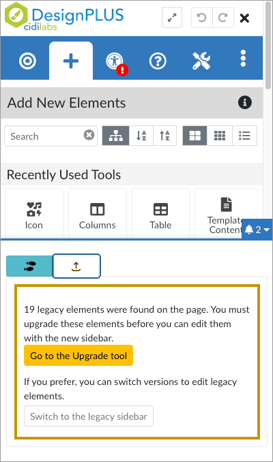 Upgrading Individual Content Items
When you are editing a content item with legacy elements, you'll receive a notification prompting you to navigate to the Upgrade tool in the Accessibility/Usability tab.
There are some small styling changes to some tools in the new DesignPLUS sidebar. This is to align with the most up-to-date accessibility guidelines and to improve the overall styling of content.
For more information, visit the DesignPLUS User Guide: Upgrade Tool page.
Course-Level Upgrades
The Course Upgrade tool allows you to review and update all course items that contain legacy content. Learn how to use this tool by viewing the tutorial below or visiting the DesignPLUS User Guide: Course Upgrade Tool page.
Migrating Legacy Customizations
If you are a Canvas Admin or Instructional Designer who has access to the DesignPLUS customizations course(s), this section is for you.
Institutions will now have two Primary Customizations courses installed at the root account: one that supplies customizations to Legacy Design Tools content, and one that supplies customizations to the new sidebar.
If you would like to continue using customizations that were created in the Legacy Design Tools Customizations course in the new sidebar, please see our article on the proper way to migrate that content:
Legacy Sunset Information
Do you have questions or need more information on the legacy sunset that occurred on December 31, 2025? Visit this article: What can we expect now that the DesignPLUS Legacy Sidebar has been sunsetted?