.svg)
This guide outlines recommended benchmarks, approaches to measuring progress, and ways to use reporting to track improvements over time.
Establish Realistic and Measurable Benchmarks
When setting accessibility goals, aim for targets that are:
Meaningful
Focus on changes that improve the learner experience, particularly for students using assistive technologies or mobile devices, or learning in varied environments. High-impact areas often include:
- Images missing alternative text
- Headings used out of order
- Links with non-descript text (e.g., URLs or “click here”)
- Color contrast issues, or color used alone for emphasis
- Videos without captions, or with inaccurate captions
- Scanned PDFs or image-only documents
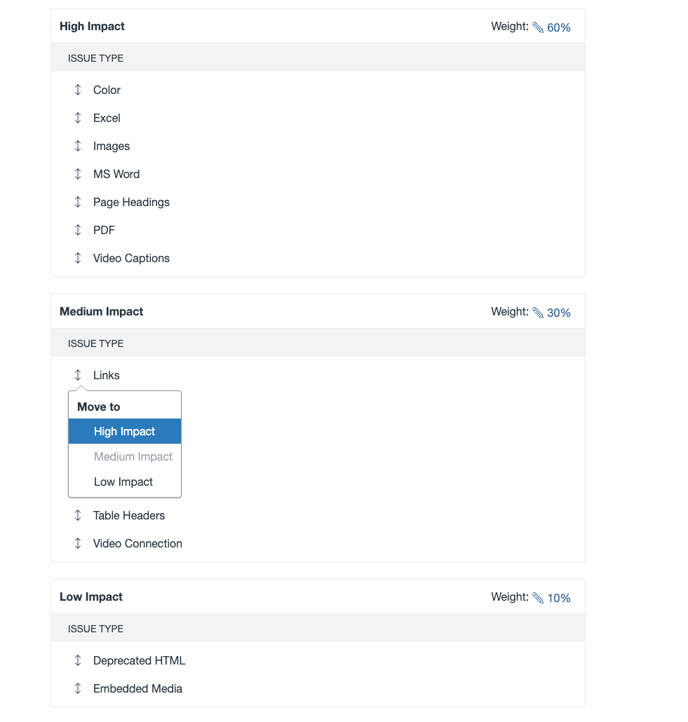
Prioritizing these areas ensures early improvements that benefit the largest number of students. Use UDOIT Admin to configure your institutional scorecard and mark the issues that most affect your students as High Impact.
Data-Informed
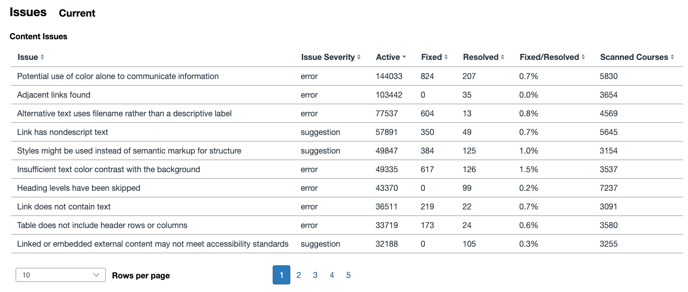
Benchmarks should reflect where courses currently stand. Use UDOIT Admin to identify the most common issues not only at the institutional level, but also at the departmental level. Align goals with each department’s specific needs, and customize outreach and training to ensure effort is directed where it will have the greatest impact.
Example: At the institutional level, the most common issue found across courses may be the use of color alone to convey information. However, your English department might see the most issues with headings out of order, while your Chemistry department struggles most with images missing alternative text. In this case, it is more effective to provide targeted guidance – support the English department with heading structure best practices and the Chemistry department with alt text guidance – rather than giving both departments broad advice about using multiple forms of emphasis.
Practical and Achievable
Large accessibility targets (e.g., “reach 90% course accessibility score across all courses this term”) can feel abstract and overwhelming for educators. These kinds of goals may also miss the mark: for example, a course with a 90% overall score could be completely inaccessible to a deaf or hard-of-hearing student if all remaining issues are auditory. Instead:
- Set scope-limited goals (e.g., “fewer than X descriptive link text issues, or 85% scores on all High Impact issue categories”).
- Use rolling improvements across terms rather than aiming for perfection in a single cycle (e.g., start with 80% on high-impact issues the first semester using UDOIT, then increase to 90% the next term).
- Encourage educators to address accessibility during scheduled course refreshes, so they can integrate remediation into work they are already doing, instead of feeling that they need to take on an entirely separate project.
- Prioritize high-enrollment courses first to maximize benefit while managing workload.
Use UDOIT Admin to edit the welcome message educators and other course designers encounter upon entering UDOIT to share goals and link to support resources.
Measure Progress
UDOIT Admin reports help you assess progress toward your accessibility goals by providing an up to six-month view of key metrics, along with term-by-term snapshots of overall accessibility scores for each department and the institution as a whole.
Track Issue Reduction Over Time
Use the Issue Count and Issue Type reports to see how the total number of issues is changing. Filter by term and/or subaccount, or issue type. Compare the number of issues before and after targeted training or outreach and monitor reductions in specific high-impact categories.
Monitor Remediation Activity and Evaluate Scorecard Improvements
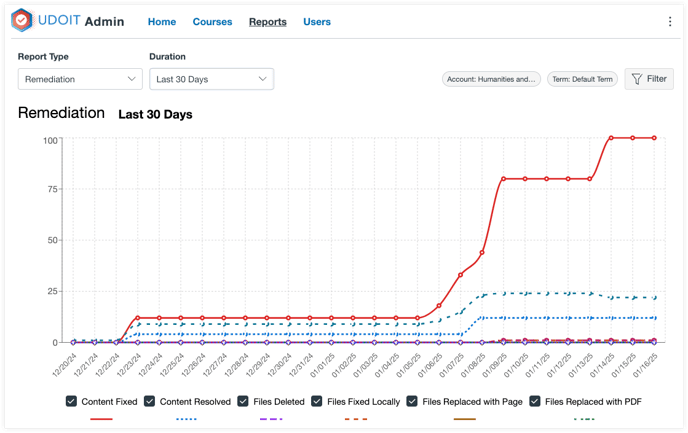
The Remediation report allows you to identify trends in content and file fixes, while the Scorecard Report helps you review how overall accessibility scores are shifting. You can use score changes and remediation numbers to confirm the impact of new training or policies.
Assess Student Use of Alternate Formats
The Student File Generations and Student File Downloads reports show how students are using alternate formats (e.g., MP3s, HTML, ePub). You can identify the formats most in demand and encourage instructors to upload source documents that support accessible transformations.
Support Resources
To help bridge that gap between knowing that accessibility matters and delivering accessible courses, Cidi Labs has developed a variety of resources to support your efforts. From the Accessibility Matters blog and webinar series to a set of white papers, these resources respond to common challenges institutions face when scaling accessible learning.
But where do you start with all these resources? Use our interactive self-check guide to assess your current processes and locate key resources to support your work every step of the way!
Next, learn how to Turn Your Accessibility Goals Into Action with our free reporting tool, Cidiscape, or our course lifecycle management tool, ReadyGO.