
A question that comes up from time to time is if there are any options in Cidi Labs DesignPLUS to create an image carousel or slideshow type of interaction.
One of the aspects of design that we seek to promote in the content that we empower users to create is that items and elements should meet both accessibility and usability best practices.
While we could technically add that type of functionality to Canvas, we have chosen not to do so for a variety of reasons. Essentially, it all boils down to the fact that carousels have been shown to be incredibly ineffective and a poor design choice.
If you don't believe us, try Googling "Should I use a carousel?" You will be hard-pressed to find any accessibility or usability advocates or articles that actually recommend using a carousel. The top result is a page that was put together by Jared Smith, who is the associate director of WebAIM. The page, Should I use a carousel?, uses a carousel to provide a quick overview of why they are a poor design decision.
Popup Image Gallery
An alternative option in the DesignPLUS sidebar is to create a pop-up image gallery for viewing and cycling through larger images. These images must be embedded into the same Content Block. To do this:
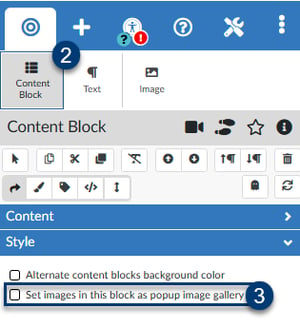 Select the Content Block that contains the images in the RCE.
- Select the Content Block tool under the Edit Existing Elements tab.
- Under Style, check the box "Set images in this block as popup image gallery."
To set individual image as popup when selected,
- Select the image in the RCE.
- Select the Image tool under the Edit Existing Elements tab.
- Under Style, toggle "Set image as popup when selected."

